Money September 2026
5 apps for when you can't say where the money went
Linking a bank account tells you where the money went after it has gone. Writing it down yourself is what makes you notice while it is going. These five all work that way — nothing asks for a bank login — and differ in what they do with the line you type: a running total, a daily allowance, a budget per category, or a page that looks like a notebook.
The apps for when you can't say where the money went are Spending Tracker, Spend Pal, Dime, Cashew and Daily Budget Original. I built Spend Pal; the other 4 are other developers’ apps.

MiaAppLog— an iOS developer who reviews other people’s apps
Published September 2026 · apps and prices last checked 6 October 2026


Spending Tracker
★★★★★★★★★★4.0 · Free · Finance · App Store 4.8 (19,449)
Spending Tracker logs an expense in a few taps and takes an optional budget for the week, month or year, with whatever is left carried over. The summary shows the main areas of spending, and you can step back through earlier periods.
Skip it if you want it free and clean: the free version runs full-screen ads that reviewers describe as hard to dismiss and sometimes not fit for a shared screen, and the one-off unlock is the only way out.



Spend Pal Editor’s pick
★★★★★★★★★★4.5 · Free · Finance · App Store 5.0 (1)
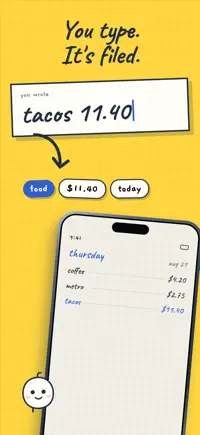
Spend Pal takes one line — type tacos 11.40, press enter — and files the amount and category onto today's page, drawn like a paper notebook. One monthly number, one bar. No account, and nobody asks for your bank.


Dime
★★★★★★★★★★4.0 · Free · Finance · App Store 4.8 (317)
Dime is free with no paywall and no ads, built by a solo student developer. Spending broken down over any period, budgets per category, recurring expenses, and a reminder to write things in.
Skip it if you need it to hold years of data: the loudest recent reviews describe entries vanishing and long gaps between updates, and there is no bi-weekly budget or opening balance.


Cashew
★★★★★★★★★★4.0 · Free · Finance · App Store 4.9 (520)
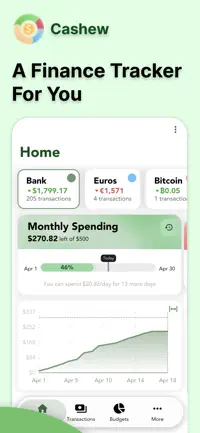
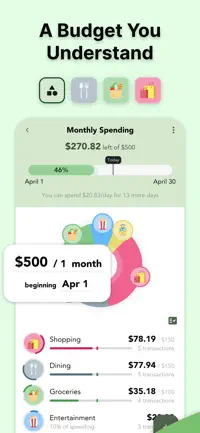
Cashew sets budgets on a monthly, weekly or your own time frame, with pie charts and bar graphs for where it went and past periods to compare against. Subscriptions and recurring payments are tracked, with reminders.
Skip it if you mostly want the phone version on its own: the few critical reviews are about restoring data from another device and the app freezing on export, and the free reports are thin.

Daily Budget Original
★★★★★★★★★★4.0 · Free · Finance · App Store 4.7 (4,841)
Daily Budget Original works out a daily budget from what is left for the month, and never connects to a bank account — the data stays on the device. The core features are free; more categories, encryption and graphs are paid.
Skip it if you cannot afford a surprise: long-time users report the daily figure changing by itself and transactions or whole cycles disappearing after updates, and the help pages do not explain the calculation.


Spend Pal is one of mine — everything else on this list is someone else’s app. How that works.
Questions
What are the apps for when you can't say where the money went?
The apps for when you can't say where the money went are Spending Tracker, Spend Pal, Dime, Cashew and Daily Budget Original. Each one had to do a different job in this particular moment — where two apps work the same way, only one of them makes the list.
Which of these apps is free?
All 5 are free to download on the App Store; some sell extras or a full version inside the app.
Which of these apps did the author build?
Spend Pal — I built it. The other 4 are other developers’ apps, and none of them knew they were going to be on this list. There are no affiliate links and no paid placements anywhere on the site.
More in Money
- 7 apps that quietly save you moneyGasBuddy · Spend Pal · Too Good To Go · Libby · Flipp · Vinted · Fetch
- 5 apps for the money your bank app can't seeSplitwise · Spend Pal · Bobby · mobile-pocket · Keep Receipt
- 6 things you used to pay for, now free on your iPhoneMerlin Bird ID · LiveMarquee · Hoopla · Map Poster · Kanopy · Google Translate